Autocomplete for every app on your Mac. A small AI model runs right on your machine, suggests the next few words as you type, and one press of Tab drops them in.
Could you look over the deck before Friday’s review? I added the pricing slide at the end.
Dana OrtizYesterday
Homepage copy, v3
Tightened the hero and moved the FAQ up. Thoughts?
Leo MartinYesterday
Offsite on Thursday
Booked the big room from 10. Bring the roadmap.
Sam OkaforTue
Invoice #2041
Attached is this month’s invoice. Thanks again!
PS
Re: Launch deck
To: Priya Shah
AaSearch
7 November 2026 at 11:07 PM
Launch plan
NProduct/Onboarding revamp
Edited just nowShare
Onboarding revamp
StatusIn progressOwnerPSPriya ShahDueNovember 28, 2026ProjectQ4 growth plan
# product ▾
Today
PS
Priya Shah9:48 AM
release notes draft is in the doc, comments welcome 🙏
DO
Dana Ortiz10:02 AM
is the release still going out wednesday?
LM
Leo Martin10:04 AM
found a login bug on staging 😬 looking into it now
What should we work on in Northwind?
NorthwindThis computer
Re: Launch deck · replying to Priya
Hi Priya, thanks for sending it over. I’ll go through it tonight andsend you my notes before Friday.Tab
Approve for meGPT-6.1 SolMedium
Press ‘/’ for commands
Press kit to Dana by Monday
Email the beta list
Book the launch-day call
On Fri, Nov 6, Priya Shah wrote:
Could you look over the deck before Friday’s review? I added the pricing slide at the end.
Answers what Priya asked, because TabPug reads the email you’re replying to.
⇧shift
Works wherever you type
Mail
Gmail
Slack
Notion
Messages
Notes
Linear
WhatsApp
Obsidian
ChatGPT
and your browser
A very good boy with a few tricks.
Everything you need to write faster, and nothing that gets in the way of how you already work.
Suggestions right at your cursor
A small bubble pops up under your cursor with the next few words, in any app. Take the next word, or all of it. Don’t want it? Just keep typing.
Can we move our call toThursday at 3pm?Tab
tab next word⇧ tab all of itesc dismiss⌃⌥⌘Z undo
Every shortcut can be changed in Settings.
Runs on your Mac. Only your Mac.
The model lives on your machine. No cloud, no account, and it works on a plane.
NEW
Learns how you write
Turn it on and TabPug picks up your phrases and your voice: formal in Mail, casual in Slack. It never learns from its own suggestions, keeps everything encrypted on your Mac, and shows you every word it saved.
MailFormal. Signs off with “Best regards”.
SlackCasual. Short sentences, often lowercase.
A phrase you always type, finished instantlyLet me know ifyou have any questions.Tab
Undo in one shortcut
Took a suggestion you didn’t mean to? One shortcut takes it back, as long as you haven’t edited it since.
⌃⌥⌘Z↓undo
Knows what you’re replying to
In an email reply, TabPug reads the message you’re answering, so suggestions actually answer it. In chats, it reads the conversation on screen.
Kind to your battery
Unplugged? TabPug switches to a lighter model, or naps until you’re charging. It pauses in Low Power Mode, too. Your call.
On batteryLighter model
Plugged inFull power
Your details, filled in
Your email, phone number or address, and the names of people you know, straight from Contacts. Only if you allow it.
Picks your model for you
Open models from Google’s Gemma 4 and Qwen, fast enough to feel instant. TabPug checks your Mac and recommends one.
Qwen3.5 2BLightest
Gemma 4 E2B
Gemma 4 E4BRecommended
Emoji by name
Type a colon and a name, like :rocket, and TabPug offers the emoji. The ones you use most come first.
Text Expander
Type a short trigger, get the full thing. And when you keep typing the same sentence, TabPug offers to make it a snippet.
Your rules, kept
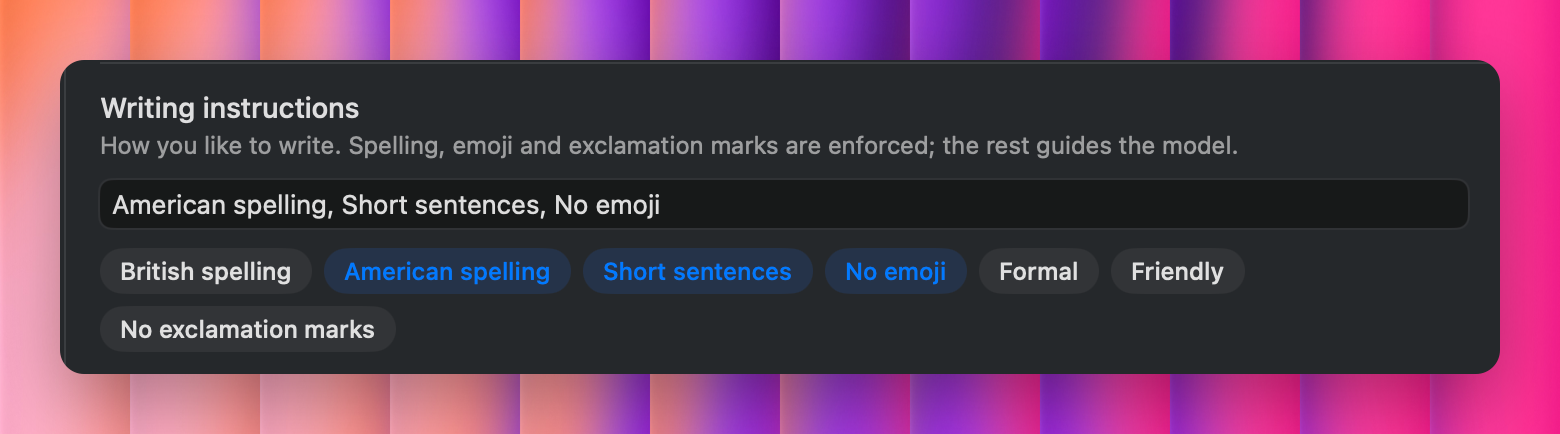
Tell TabPug how you like to write. Spelling, emoji and exclamation marks are enforced on every suggestion; the rest guides the model.
You decide where it helps
Turn TabPug off in any app or website with one switch. It always skips password fields, and stays out of code editors unless you ask. If it isn’t suggesting somewhere, “Why isn’t it suggesting?” in the menu bar tells you why.
Mail
Slack
notion.so
Notes
Terminal
bank.example.com
Set up in about two minutes.
1
Give it a few permissions
macOS asks for three. TabPug explains each one in plain words, and why it’s needed.
2
Pick a model
Take the one TabPug recommends for your Mac. It downloads once, then works offline for good.
3
Start typing
Open any app and write. When a suggestion pops up under your cursor, press Tab. That’s the whole trick.
PRIVACY
Your words stay home.
Most AI writing tools send what you type to a server. TabPug doesn’t have one to send it to.
Works fully offline
Turn off Wi-Fi. Suggestions keep coming.
No account
No sign-up, no email, no profile about you.
Skips password fields
Secure inputs are ignored completely, always.
Learning is opt-in
Off until you turn it on. Encrypted on your Mac (the key never goes into backups), and you can read or delete every word.
History you control
Keep accepted suggestions for an hour, a day, a week, or not at all.
Leaves nothing behind
One click uninstalls TabPug and everything it stored.
Plans
Pay once. No subscription treats.
Try everything free for 3 days. Keep it if it earns its spot.
Both plans include every feature. Not sure? Start the free trial, no card needed.
Questions, answered
Does TabPug send what I type anywhere?
No. The AI model runs on your Mac, so your text never leaves it. TabPug only goes online to download models and check for app updates.
Which Macs does it work on?
Any Mac running macOS 14 Sonoma or later. We recommend Apple silicon Macs (M1, M2, M3 and so on) with at least 16 GB of memory. While it's on, TabPug uses about 1–6 GB of memory, depending on the AI model you choose, and it recommends one that runs smoothly on your Mac.
Will it slow my Mac down?
Models are small and only work while you type. On battery, TabPug can switch to a lighter model or pause, and it pauses in Low Power Mode if you like.
Which apps does it work in?
Almost anywhere you type: Mail, Slack, Notion, Messages, Notes and your browser. You can switch it off per app or per website. It always skips password fields, and stays out of code editors unless you turn them on.
Does it work in every app?
Not every one, though it works in most popular apps. TabPug reads and types text through the Accessibility features built into macOS, so it works in apps that support them, like Mail, Notes, Messages, Slack, Notion, Obsidian and your browser. Some apps draw their own text without sharing it with macOS: many games, remote desktop and virtual machine windows, and a few apps built on custom frameworks. There, TabPug stays quiet. If it isn’t suggesting somewhere, “Why isn’t it suggesting?” in the menu bar tells you why, and the free trial is an easy way to check the apps you use.
Why does it need Accessibility, Input Monitoring and Screen Recording?
Accessibility lets it read the text field you’re typing in and insert suggestions. Input Monitoring lets it notice when you press Tab. Screen Recording lets it read the text just above your cursor for context; you can turn that off. Nothing is recorded or saved.
Does it learn from what I type?
Only if you turn on Learn from my writing. Then it keeps what you wrote (never its own suggestions, passwords, code or excluded apps), encrypted on your Mac, and its key is never included in backups. You can read every passage, delete any of them, or delete all of it.
Which AI models does it use?
Open models from Qwen (Qwen3.5) and Google (Gemma 4), released under the Apache 2.0 licence. TabPug downloads the one you pick from Hugging Face, once.
How do I remove it completely?
Settings › Uninstall TabPug removes the app along with its models, history, settings and permissions. Nothing is left behind.
Sit. Stay. Tab.
Write faster in every app, with an AI that learns how you write and never leaves your Mac.

 Mail
 Gmail
 Slack
 Notion
 Messages
 Notes
 Linear
 WhatsApp
 Obsidian
 ChatGPT


 Terminal